
FB Panel
A local hosting control panel for domains, websites and site files — built to show the machine’s real state instead of keeping a second copy of the truth.
- single Node.js program
- live machine readings
- 6 sections
- home network
What FB Panel is
A hosting control panel for one server. After signing in, six sections let the owner give the server a domain name, create a website and manage that website’s files without opening a terminal.
Its shape is familiar if you have used cPanel or Plesk, but this one is intentionally small: one readable program, local tools, a narrow privilege model and an activity log for changes.
- 6 sections
- 4 working today
- local network
One program
Node.js web server. Serves every page itself — there is no separate front end to drift out of sync.
Real tools
Website, DNS, WordPress, file-permission and theme work is delegated to named system helpers.
Live state
The machine is the authority. Most of what you see is read directly from nginx, services, disks and files.

Sign in, stay local, leave a trail
The crew look is the visual language around the panel; the panel itself stays a practical admin tool. Security is intentionally narrow, because a successful sign-in can take a website offline.
Password storage
The password itself is never stored. A deliberately slow derivation with a unique random value is used.
Constant-time check
Wrong passwords are rejected in a way that does not leak information through timing.
Signed browser ticket
Page scripts cannot read it, it is not sent to other sites, and it expires after 12 hours idle.
Failed attempts logged
Rejected sign-ins go into the activity log with the username that was tried.
Owner password setup. The password is read from standard input, not the command line, so it never lands in terminal history, the process list or on screen. Minimum eight characters.
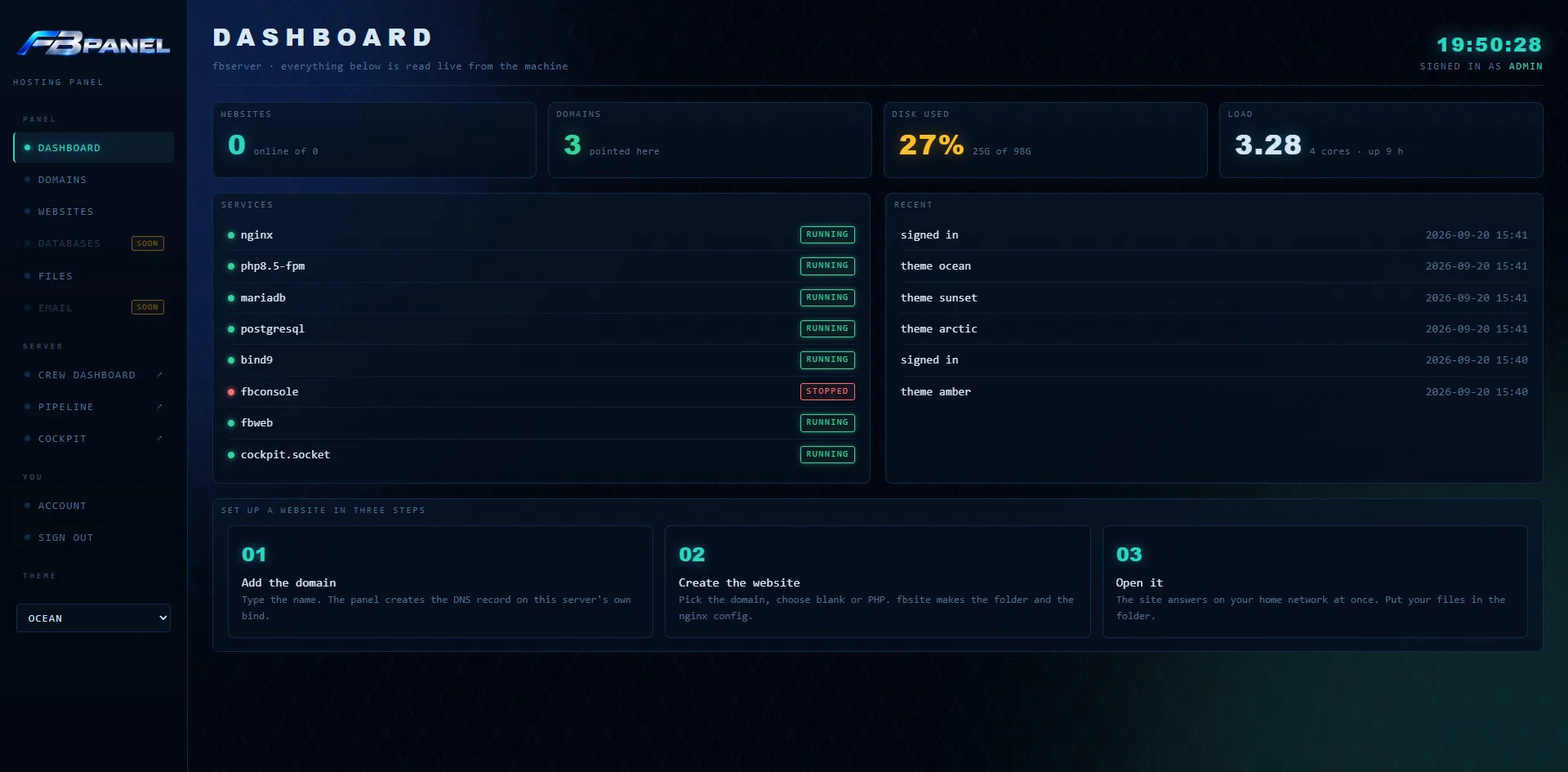
The first page after sign-in
- Websites — how many sites are switched on out of how many exist. A disabled site still exists; it just stops answering.
- Domains — how many names point at this server.
- Disk used — percentage full, with the real figures beside it.
- Load — how hard the machine is working, with core count and uptime for context.
Services
Eight components checked directly: nginx, PHP, MariaDB, PostgreSQL, bind9, fbconsole, fbweb and Cockpit. Green running, red stopped.
Recent
The last six activity-log entries: what the panel changed, who asked and when. The panel's memory of itself.
Names this server answers to
Adding a domain
Records the name in the panel and creates a DNS record on the server's own name server, so home-network devices can find the site. Names are checked against a strict pattern; invalid or duplicate names are refused before anything is created.
Reading the DNS status
bind · A record means the local DNS record was created. not on bind means the name is in the list but the record was not made.
Real internet domains
The panel creates records on this server. A public domain you own is still pointed here from your registrar — a separate, external step.
Removing one safely
Asks for confirmation, removes the record and the name, and keeps the old zone file in a removed-zones folder. If a website still uses the domain, removal is refused.
Design principle: the panel says when a record was not created. It never hides the condition or pretends the operation succeeded.
Sites hosted on this server
Measured, not remembered. The Websites page keeps no list of its own. Each time you open it, the panel reads nginx’s configuration folder and reports what it finds. Only configurations created by the site tool are offered for management; hand-written ones are left alone.
Blank
A plain website for HTML files.
PHP
A site with PHP handling switched on.
WordPress
WordPress plus its database, user, configuration and fresh security keys.
Enable / disable
Disabling takes a site offline without touching its contents. Enabling puts it back.
Remove ≠ destroy
Site files move to a removed-sites folder. WordPress databases are exported first, so content stays recoverable.
How type is detected
A WordPress config file means WordPress; a PHP handler in nginx means PHP; neither means plain.
Before creation the panel lists every step — folder, nginx config, test, reload, WordPress work. Afterwards it prints the real tool output on screen.
A file manager that stays inside one website
The site picker chooses the website you are working in. Every file operation resolves the requested path to its real final location — following shortcuts and “go up a level” tricks — then checks that the destination is genuinely inside that site’s folder. If it is not, the operation stops.
1 · Request
You pick a path: browse, edit, upload, rename or move to trash.
2 · Resolve
Find the real destination: follow links and normalise parent-directory movement.
3 · Check
Inside the selected site? Only then may the operation continue.
Why this approach: suspicious path text is not stripped or guessed at. The real destination is resolved first, then the boundary is checked.
Browsing
Folders first, then files, with type, size and last-change time.
Editing
Text files under 1 MB, in the browser. Ctrl+S saves, Tab indents.
Uploading
Drag and drop or button. Up to 200 MB per file, one at a time.
Private folders hidden
Trash and saved versions stay out of the normal listing.
Versions, trash and quiet permission repair
Every save keeps the previous file
Before a text file is overwritten, the old version is copied into a versions folder with the date and time. A breaking edit can be rolled back.
There is no delete button
Trash moves an item into the site's own trash folder and records where it came from. Restore puts it back — renamed if the old spot is taken.
Permissions handled quietly
If the panel cannot write, a dedicated tool corrects ownership. If that fails, the panel reports it instead of half-completing.
Rename protection. Names starting with an underscore are refused (panel-private folders use that), and so is renaming over an existing name.
Trash is never emptied in the UI. Permanent deletion stays an explicit human action, done from a terminal.
FB Panel inside the wider FB Server
Serra and the crew are the presentation layer and story world. Underneath, the panel is a real machine interface.
Account. Change the password with the current one plus the new one twice; the account list shows the last sign-in time.
Shared themes. The panel uses the same theme library as the other FB Server screens — a change applies in the browser and on the server.

Crew Dashboard →
The server's live operational display.
Pipeline →
The server's separate read-only pipeline screen.
Cockpit
The system's own management console.
What the panel can change — and how that power is contained
The panel runs as an ordinary program. Tasks that genuinely need administrator power go to a short, named list of tools, and each tool gets only the right it needs for that one job.
Site tool
Make, enable, disable and remove websites.
DNS tool
Add and remove local DNS records.
WordPress tool
Install or remove WordPress, its database and files.
Files tool
Correct website-folder ownership so files can be edited.
Theme tool
Set the theme shared by the machine's screens.
No arbitrary command path. Nothing typed into a form becomes a free-form command. The helper is named separately from its arguments.
Every change enters the activity log with the account name and time.
Boundary: not for the public internet. A home-network password opens actions that can take a site offline. That is why sessions expire, failures are logged and the panel is built for the house network.
Put a WordPress site on the server
- 01 · Add the domain — open Domains, enter the name, add it. Check the DNS column says bind A record before continuing.
- 02 · Create the website — Websites → New website, pick the domain, choose WordPress.
- 03 · Read the real output — the panel shows what the tools actually printed, including where to continue.
- 04 · Finish WordPress — open the new site and complete WordPress's own setup. The panel stops at the edge of what it owns.
- 05 · Work on the files — upload, edit and organise in Files. Saved versions and trash give two ways back.
What is not built yet
Unfinished areas are shown, not hidden. Database and Email sit in the sidebar with a SOON label because they are planned, not complete.
One owner
No customer accounts yet, so no per-customer access model.
No certificates
Sites are served without encryption — acceptable only on the home network.
Home network only
Remote internet access is outside this version's scope.
No database page
WordPress gets a database automatically; manual management is not built yet.
No email
Email management is not in this prototype.
One site per domain
A stated design rule of the current build.
Databases — soon. The engines already run and WordPress creation makes what it needs. The missing part is a human-facing page.
Email — soon. Running a mail server well is much harder and carries abuse risk, so it is deliberately a later problem.
Local hosting, visible decisions.
FB Panel is the management side of the project — domains, websites and site files in a graphical interface — while the Crew Dashboard stays the read-first operational screen.
← Crew Dashboard
Catalog 01
FB Pipeline →
Next · Catalog 03
